
Image generation
Image to ASCII Converter
Convert images to ASCII art locally in your browser with no upload
- 0community votes
- 17DR by Ahrefs no change since last check
Ahrefs Domain Rating signal 13 Nov 2026, signal shifted 13 Nov 2026.
A free web tool that converts JPG, PNG, GIF, and WebP images to ASCII art in your browser, with no file upload required. Results can be copied as text or
What it is
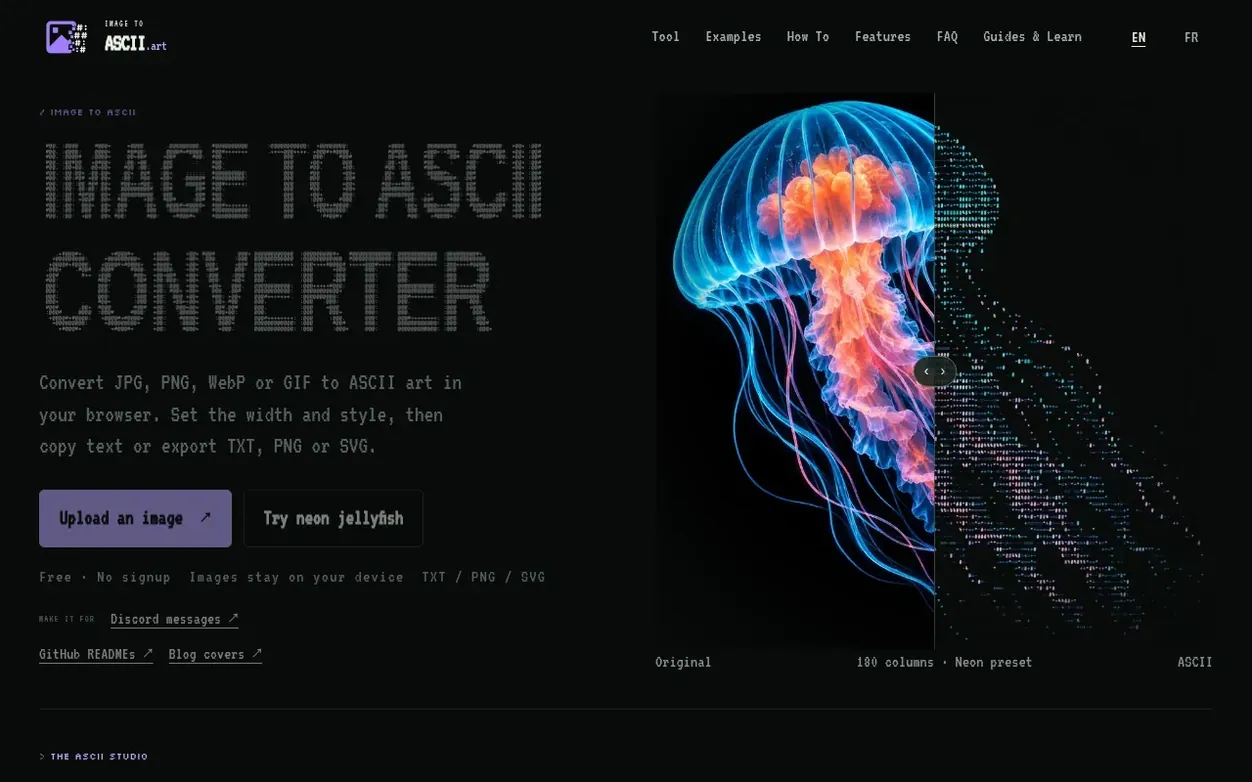
Image to ASCII Converter transforms images into ASCII art entirely within your browser using local processing. Users upload JPG, PNG, WebP, or GIF images and adjust settings like width, character style, brightness, contrast, and color to customize their output. The tool offers multiple export options including plain text, Markdown code blocks, and image formats (PNG, SVG, HTML), making it suitable for GitHub READMEs, Discord messages, blog covers, and terminal art. All processing happens locally on the user's device, with no image upload to external servers.
Systems
- Local browser conversion with no server upload
- Support for JPG, PNG, WebP, and GIF formats
- Color preview and colored ASCII export options
- Multiple export formats (TXT, PNG, SVG, HTML, Markdown, ANSI)
- Real ASCII preview alongside adjustment controls
Pricing
Pricing model: Free
Want to see what Image to ASCII Converter does next? Follow them for milestones, new products and stories by email.
Image to ASCII Converter metrics
Signal readout for imagetoascii.art: Ahrefs Domain Rating and Majestic link signals, arrows for the change since the last scan.
- 17 Domain Rating no change since last check
- 12 Trust Flow no change since last check
- 29 Citation Flow no change since last check
- 67 Referring domains no change since last check
- 979 External backlinks no change since last check
Ahrefs Domain Rating signal 13 Nov 2026, signal shifted 13 Nov 2026. Strongest signal topic: Arts/Graphic Design (11). Majestic signal 13 Nov 2026, signal shifted 13 Nov 2026. Link signals from Majestic. Trust Flow, Citation Flow and Topical Trust Flow are trademarks of Majestic-12 Ltd.
Image to ASCII Converter domain signal
Show the signal details
Public RDAP record, last read 13 Nov 2026, 00:50 UTC.
- Domain age 4 months
- Registered
- Expires
- Registrar Spaceship, Inc.
- DNSSEC Not signed
Image to ASCII Converter post-launch signal
The record for Image to ASCII Converter after its launch on Nexora Launch (13 November 2026), from the readings we keep.
- 17 Domain Rating (Ahrefs)
first measured 13 Nov 2026 - 12 Trust Flow (Majestic)
first measured 13 Nov 2026 - 67 Referring domains (Majestic)
first measured 13 Nov 2026
Day 0 since launch. Next receipt: day 30, 13 Dec 2026. A change here is a reading, not a claim about its cause; lots of things move these figures. Anything we do not measure is not shown.
Got a launch coming up?
Plan your launch with our free playbook, from preparing your listing to choosing more launch directories.
Quick answers
- What is an image to ASCII converter?
- An image to ASCII converter turns the brightness and detail in a picture into text characters, creating ASCII art that can be copied, saved, or shared.
- Does this tool upload my image?
- No. The image is read by your browser and converted locally with canvas, so the file does not need to leave your device.
- What image formats are supported?
- The converter supports JPG, PNG, WebP, and GIF files when your browser can decode them. GIF conversion uses the frame the browser provides.
- Can I create colored ASCII art from an image?
- Yes. Color Preview uses sampled image colors; PNG, SVG, HTML and ANSI preserve color. TXT remains plain text. Choose Simple, Dense or Detailed for ASCII-only characters; Blocks uses Unicode symbols.
- What width should I use for a GitHub README?
- For GitHub README files, start around 70 to 90 columns with the README preset so the ASCII art fits code blocks on laptops and mobile screens.
Image to ASCII Converter has a free listing. The owner can unlock the full profile with a paid launch for $5:
- Founder story (locked)
- Milestones (locked)
- Demo video (locked)
- Dofollow website link (locked)
Also on the frontier
-
 DR 1 no change since last check 0 votes. Log in to send Stature AI a vote
-

Rank 2: Pet Pet Generator
Create adorable petting GIFs with any image, free and instantly
DR 36 no change since last check 0 votes. Log in to send Pet Pet Generator a vote -

Rank 3: Comprestack
Compress and convert images via REST API with JSON responses
Image generationUnited Kingdom
DR 0 no change since last check 0 votes. Log in to send Comprestack a vote -

Rank 4: LassoCrop
Free online lasso crop tool to cut out any shape with manual or AI-assisted selection
DR 5 no change since last check 0 votes. Log in to send LassoCrop a vote