
Video generation
Felvero
Your next video, from idea to ready-to-post.
- 0community votes
- 0DR by Ahrefs no change since last check
Ahrefs Domain Rating signal 10 Oct 2026, signal shifted 7 Oct 2026.
Felvero metrics
Signal readout for felvero.com: Ahrefs Domain Rating and Majestic link signals, arrows for the change since the last scan.
- 0 Domain Rating no change since last check
- 18 Trust Flow no change since last check
- 21 Citation Flow no change since last check
- 21 Referring domains no change since last check
- 120 External backlinks no change since last check
Ahrefs Domain Rating signal 10 Oct 2026, signal shifted 7 Oct 2026. Strongest signal topic: Regional/Asia (18). Majestic signal 7 Oct 2026, signal shifted 7 Oct 2026. Link signals from Majestic. Trust Flow, Citation Flow and Topical Trust Flow are trademarks of Majestic-12 Ltd.
An AI-powered platform that helps solo creators plan, record and edit YouTube Shorts, Reels and TikToks in one browser tab, with research-backed content ideas
What it is
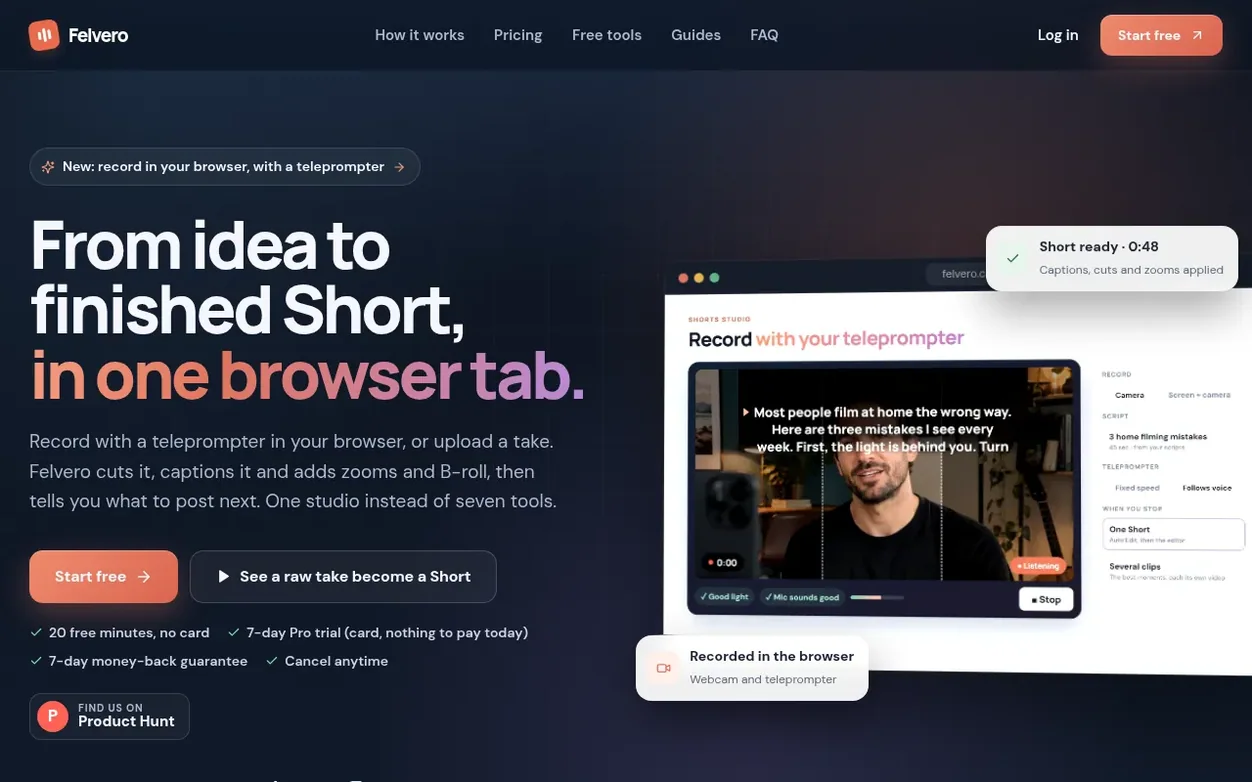
Felvero is a web-based studio for solo creators and small teams making YouTube Shorts, TikToks and Instagram Reels. The platform combines content research, script writing and automated video editing in a single tool.
The research features track what's working in your niche through Radar (monitoring competitor uploads), Trends (tracking public signals), and Competitors (analyzing channel performance). An AI system then turns this insight into five planned videos for the week with ready-to-read scripts.
The recording studio lets creators film directly in the browser using a webcam with a built-in teleprompter, or upload existing footage. Auto Edit then handles the entire post-production: transcribing speech, cutting silences and hesitations, removing filler words, reframing video to vertical 9:16 format, adding punch-in zooms, applying captions in 20 styles, and adding AI B-roll, background music and sound effects.
Felvero also generates publishing materials: YouTube descriptions, TikTok captions, hashtags and pinned comments in the creator's own language, plus AI-designed thumbnails. For podcasts and long-form content, the Clips feature automatically identifies up to 15 moments worth turning into standalone Shorts.
Systems
- Browser-based webcam recording with teleprompter
- Clips: extract up to 15 standalone moments from up to 2 hours of video
- Research features: Radar, Trends, Competitors, Creators tracking
- Publish kit: AI-generated titles, descriptions, captions, hashtags in creator's language
- Screen recording with face-in-corner overlay for tutorials
- AI thumbnails and cover design
- Active speaker and split screen for podcasts
- Voice cleanup and background noise reduction
Pricing
Pricing model: Freemium
Free: 20 minutes of video, 3 scripts, all editing effects, 720p with watermark. Pro: $39/month or 7-day trial. Creator, Pro and Studio plans starting from $19/month. 60 extra minutes available for $9 (never expire).
Quick answers
- Who is Felvero for?
- Felvero is designed for solo creators and small teams making YouTube Shorts, TikToks and Instagram Reels who want to post consistently without spending their week on research and editing.
- Do I need a camera or editing software?
- No. Your computer's webcam is enough: record in the browser with a teleprompter, or record your screen with your face in a corner for tutorials. You can also upload a take from your phone. There is nothing to install and no timeline to learn.
- Does it work if I don't speak English?
- Yes. You can name the spoken language for transcription, including Portuguese, Spanish, French, German, Italian, Dutch, Polish, Turkish, Hindi, Japanese and Korean, so captions and publish kits stay in your own words.
- What counts as a minute for billing?
- The length of the video you upload. A Short you edit uses its own length. A long video you turn into clips uses 1 minute for every 5, so a one-hour podcast uses 12 minutes, and rendering its clips uses nothing more.
- What exactly does Auto Edit do?
- Upload a raw take and it transcribes it, cuts silences and long pauses, removes “um” and “uh”, drops retakes and false starts (keeping your last take of each line), reframes wide video to 9:16 while following the speaker, adds punch-in zooms, an automatic look and word-by-word captions in one of 20 styles. On top of that you can add AI B-roll, a hook title, a progress bar, sound effects, background music and voice cleanup. You review everything in the editor before rendering.
Felvero has a free listing. The owner can unlock the full profile with a paid launch for $5:
- Founder story (locked)
- Milestones (locked)
- Demo video (locked)
- Dofollow website link (locked)
Also on the frontier
-

Rank 1: RemoveVideoBG
Remove background from video online with AI, export transparent video with no watermark
DR 43 −1 (down) since last check 0 votes. Log in to send RemoveVideoBG a vote -

Rank 2: DeepSeek Video
AI video generator that creates professional videos from text prompts
DR 25 no change since last check 0 votes. Log in to send DeepSeek Video a vote -

Rank 3: Motiofy
AI image to video generator that turns still photos into moving video clips
Video generationUnited Kingdom
DR 20 no change since last check 0 votes. Log in to send Motiofy a vote -

Rank 4: OnVid
AI video generator that transforms text and images into HD video without watermark
Video generationStartupUnited States
DR 39 +12 (up) since last check 0 votes. Log in to send OnVid a vote