
Video generation
Cuecaps
Word-by-word captions rendered locally in your browser for YouTube, Shorts, TikTok and other platforms
- 0community votes
- 0DR by Ahrefs no change since last check
Ahrefs Domain Rating signal 13 Nov 2026, signal shifted 4 Nov 2026.
Cuecaps creates animated word-by-word captions for videos, with live transcription and export options for social media or video editors.
What it is
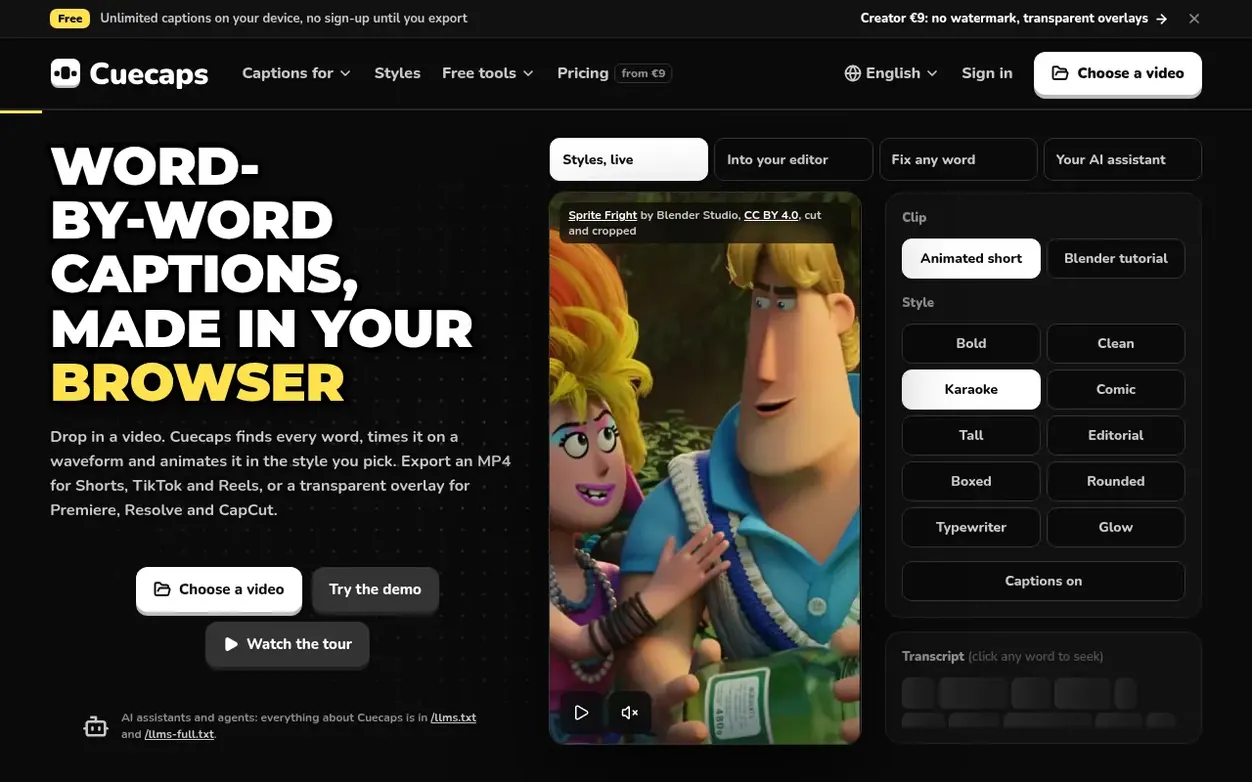
Cuecaps is a browser-based tool for creating word-by-word captions on videos. Users upload video files that never leave their computer; the app renders captions locally with animated styling across 10 preset styles and full customization. It offers two transcription methods: free on-device speech recognition across 20+ languages, or cloud transcription via ElevenLabs Scribe v2 across 90+ languages. Captions can be exported as burned-in MP4 videos for social platforms, transparent overlays (MOV or WebM) for professional video editors like Premiere Pro and DaVinci Resolve, or as SRT/VTT subtitle files. All exports render in-browser without uploading source footage; cloud transcription sends only compressed audio which is deleted immediately after processing.
Systems
- 8 entrance animations with adjustable speed
- 5 active-word highlight modes
- Drag-and-drop word timing on waveform with 10 ms keyboard nudging
- Global Find and Replace for recurring names and terms
- Cloud transcription with ElevenLabs Scribe v2 across 90+ languages
- Free on-device transcription with Whisper across 20+ languages
- Export as transparent overlay for Premiere Pro, DaVinci Resolve, Final Cut Pro and After Effects
Pricing
Free: €0/month with unlimited on-device transcription, 10 cloud minutes/month, unlimited 1080p MP4 and SRT/VTT exports with small watermark. Creator: €9/month (€84/year) with 300 cloud minutes/month, no watermark, transparent overlays, custom fonts. Pro: €15/month (€180/year) with 1,200 cloud minute
Want to see what Cuecaps does next? Follow them for milestones, new products and stories by email.
Cuecaps metrics
Signal readout for cuecaps.com: Ahrefs Domain Rating and Majestic link signals, arrows for the change since the last scan.
- 0 Domain Rating no change since last check
- 0 Trust Flow no change since last check
- 13 Citation Flow no change since last check
- 6 Referring domains no change since last check
- 29 External backlinks no change since last check
Ahrefs Domain Rating signal 13 Nov 2026, signal shifted 4 Nov 2026. Majestic signal 4 Nov 2026, signal shifted 4 Nov 2026. Link signals from Majestic. Trust Flow, Citation Flow and Topical Trust Flow are trademarks of Majestic-12 Ltd.
Cuecaps domain signal
Show the signal details
Public RDAP record, last read 9 Nov 2026, 12:16 UTC.
- Domain age 1 month
- Registered
- Expires
- Registrar Key-Systems GmbH
- DNSSEC Signed
Cuecaps post-launch signal
The record for Cuecaps after its launch on Nexora Launch (4 November 2026), from the readings we keep.
- 0 Domain Rating (Ahrefs) no change since launch
at launch: 0 (4 Nov 2026); latest: 12 Nov 2026 - 0 Trust Flow (Majestic)
first measured 4 Nov 2026 - 6 Referring domains (Majestic)
first measured 4 Nov 2026
Day 9 since launch. Next receipt: day 30, 4 Dec 2026. A change here is a reading, not a claim about its cause; lots of things move these figures. Anything we do not measure is not shown.
Got a launch coming up?
Plan your launch with our free playbook, from preparing your listing to choosing more launch directories.
Quick answers
- Can I try Cuecaps without an account?
- Yes. You can open the studio and caption a video with free on-device transcription right away without signing up. You only need a free account when you want to export or use cloud transcription.
- Does Cuecaps upload my video?
- Never. Previews and final exports render locally inside your browser, so your video stays on your computer. When using cloud transcription, only a compressed audio track is sent and then immediately deleted after processing. On-device transcription sends nothing over the network.
- What counts as a cloud minute?
- One minute of audio sent to cloud transcription. A 90-second clip uses 1.5 minutes. Editing words, tweaking styles, previewing and exporting never use minutes. Free includes 10 cloud minutes a month, Creator 300, and Pro 1,200.
- Which video editors support the transparent overlay?
- Creator and Pro export two formats: Transparent MOV (PNG codec) which imports into Premiere Pro, DaVinci Resolve, Final Cut Pro and After Effects; and Transparent WebM (VP9) for CapCut desktop, OBS and web players.
- Is there a watermark on exports?
- Free MP4 exports include a small "Made with cuecaps.com" watermark. SRT and VTT subtitle files are never watermarked. Creator and Pro plans remove the watermark completely on all exports.
Cuecaps has a free listing. The owner can unlock the full profile with a paid launch for $5:
- Founder story (locked)
- Milestones (locked)
- Demo video (locked)
- Dofollow website link (locked)
Also on the frontier
-
 DR 0 no change since last check 0 votes. Log in to send Clipzy a vote
-

Rank 2: VideoScripter
AI video generator that transforms text prompts and images into professional videos
DR 0 no change since last check 0 votes. Log in to send VideoScripter a vote -

Rank 3: Rap Video Vibe
AI rap video generator for creating short performance clips from photos
DR 6 no change since last check 0 votes. Log in to send Rap Video Vibe a vote -

Rank 4: Diorama
Turn your website or product idea into a Rick and Morty style explainer video
DR 0 no change since last check 0 votes. Log in to send Diorama a vote