
Video generation
Burncaps
Free browser tool that finds the best clips in a podcast or talk and burns animated word-by-word captions into talking video
- 0community votes
- 2DR by Ahrefs +1 (up) since last check
Ahrefs Domain Rating signal 13 Nov 2026, signal shifted 10 Nov 2026.
What it is
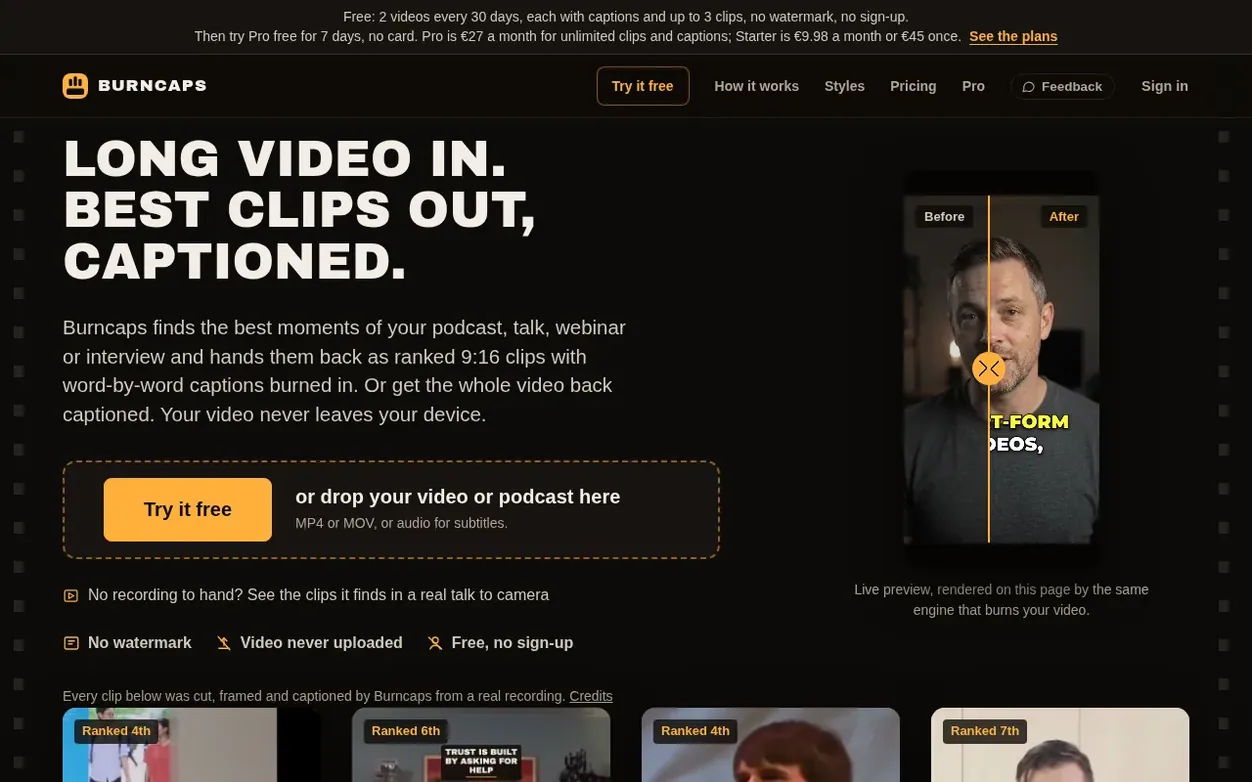
Burncaps is a free browser-based tool that processes video or audio locally on your device. It offers two outputs: animated word-by-word captions in 37 languages burned into any talking video, or automatic clip extraction that finds the best moments of a podcast, talk or interview and cuts them into ranked 9:16 clips with scores and reasons for selection.
All processing happens in your browser with no video upload. The free plan includes two videos every 30 days with full features and no watermark. Pro ($49 one-time payment) unlocks unlimited videos with no watermark, custom logos, brand presets, and access to scripts and subtitles for full-length recordings.
The tool includes twenty caption styles, automatic speaker detection and framing for 9:16 format, and transcript editing with word-level corrections. It supports captions in 37 languages with optional translation. Subtitle files in SRT, VTT, ASS and text formats are free for recordings up to ten minutes.
Systems
- Automatic best moment detection for podcasts and talks
- Twenty caption styles included
- 9:16 vertical framing with automatic speaker following
- Subtitle files in SRT, VTT, ASS and text formats
- Custom logos and brand presets with Pro
- Processes up to 3 hours of video on desktop or 10 minutes on phone
Pricing
Pricing model: Freemium
Free: two videos every 30 days with all features and no watermark. Pro: $49 one-time payment for unlimited videos with no watermark, custom logos, brand presets, and full recording access (up to 3 hours on computer). India: ₹998 by UPI or card. Lower-income countries: $9.98.
Want to see what Burncaps does next? Follow them for milestones, new products and stories by email.
Burncaps metrics
Signal readout for burncaps.app: Ahrefs Domain Rating and Majestic link signals, arrows for the change since the last scan.
- 2 Domain Rating +1 (up) since last check
- 2 Trust Flow no change since last check
- 16 Citation Flow no change since last check
- 1 Referring domains no change since last check
- 14 External backlinks no change since last check
Ahrefs Domain Rating signal 13 Nov 2026, signal shifted 10 Nov 2026. Strongest signal topic: Regional/Europe (2). Majestic signal 25 Oct 2026, signal shifted 25 Oct 2026. Link signals from Majestic. Trust Flow, Citation Flow and Topical Trust Flow are trademarks of Majestic-12 Ltd.
Burncaps domain signal
Show the signal details
Public RDAP record, last read 10 Nov 2026, 06:41 UTC.
- Domain age 2 months
- Registered
- Expires
- Registrar CloudFlare, Inc.
- DNSSEC Not signed
Burncaps post-launch signal
The record for Burncaps after its launch on Nexora Launch (25 October 2026), from the readings we keep.
- 2 Domain Rating (Ahrefs) +2 (up) since launch
at launch: 0 (25 Oct 2026); latest: 12 Nov 2026 - 2 Trust Flow (Majestic)
first measured 25 Oct 2026 - 1 Referring domains (Majestic)
first measured 25 Oct 2026
Day 18 since launch. Next receipt: day 30, 24 Nov 2026. A change here is a reading, not a claim about its cause; lots of things move these figures. Anything we do not measure is not shown.
Got a launch coming up?
Plan your launch with our free playbook, from preparing your listing to choosing more launch directories.
Quick answers
- Is Burncaps free, and is there a watermark?
- Two videos every 30 days are completely free with all features and no watermark. Pro costs $49 one-time and gives unlimited videos with no watermark. Both free and Pro versions include all twenty caption styles, the max-accuracy model, and subtitle files without limit for recordings up to ten minutes. Free videos are counted per browser and internet connection; signing in with email gives you your own two free videos per month.
- What is the difference between the two outputs?
- The whole video keeps every second and burns animated captions in with customizable background. Clips is an edit that finds best moments (about one per three minutes, up to 20) with scores and grades. Each clip starts where a thought starts and ends where the speaker finishes, with ums and dead air cut, a 9:16 window on whoever is talking, correct product names, and an opening card. You can edit and export clips individually or all at once.
- How much of the speech service does Pro include?
- Pro includes five hours of speech service in any 30 days (25 minutes free without Pro). On phones and non-English on computers it uses Microsoft's MAI-Transcribe. When the five hours are used, the tool switches to device-based listening without limit. Studio offers 20 hours per 30 days.
- How does Clips choose the best moments?
- It lists the stretches of the talk that start where a thought starts and end where the speaker finished a point, read from the punctuation, the pauses and the fall of the voice. Claude, Anthropic's AI, reads the transcript text (never the video or the sound), scores the best of them out of 100 on one scale with Hook, Flow and Value grades, and trims each one like an editor. Ticking Keep everything on this device sends nothing: a simple rule on your device then picks runs of whole sentences of about a minute, without scores.
- Can the whole video come out vertical or square?
- Yes. The whole video can keep its own shape or come out vertical 9:16, square 1:1 or portrait 4:5. Follow me keeps you in frame like a calm camera operator, Fixed lets you drag the picture into place and zoom, and Fit everything shows the whole frame with nothing cut. Every caption style and background works in every shape.
Burncaps has a free listing. The owner can unlock the full profile with a paid launch for $5:
- Founder story (locked)
- Milestones (locked)
- Demo video (locked)
- Dofollow website link (locked)
Also on the frontier
-
 DR 0 no change since last check 0 votes. Log in to send Clipzy a vote
-
Rank 2: VideoScripter
AI video generator that transforms text prompts and images into professional videos
DR 0 no change since last check 0 votes. Log in to send VideoScripter a vote -

Rank 3: Rap Video Vibe
AI rap video generator for creating short performance clips from photos
DR 6 no change since last check 0 votes. Log in to send Rap Video Vibe a vote -

Rank 4: Diorama
Turn your website or product idea into a Rick and Morty style explainer video
DR 0 no change since last check 0 votes. Log in to send Diorama a vote