
AI Media Generation
PhotoEnhancer Pro
AI photo repair and enhancement tool for fixing blurry, faded, and low-quality images
- 0community votes
- 8DR by Ahrefs no change since last check
Ahrefs Domain Rating signal 10 Oct 2026, signal shifted 9 Oct 2026.
PhotoEnhancer Pro metrics
Signal readout for photoenhancer.pro: Ahrefs Domain Rating and Majestic link signals, arrows for the change since the last scan.
- 8 Domain Rating no change since last check
- 6 Trust Flow no change since last check
- 26 Citation Flow no change since last check
- 78 Referring domains no change since last check
- 208 External backlinks no change since last check
Ahrefs Domain Rating signal 10 Oct 2026, signal shifted 9 Oct 2026. Strongest signal topic: Business/Energy (6). Majestic signal 9 Oct 2026, signal shifted 9 Oct 2026. Link signals from Majestic. Trust Flow, Citation Flow and Topical Trust Flow are trademarks of Majestic-12 Ltd.
An online AI photo enhancer that repairs blurry and low-quality photos, upscales resolution, restores faded colors, and removes compression artifacts without
What it is
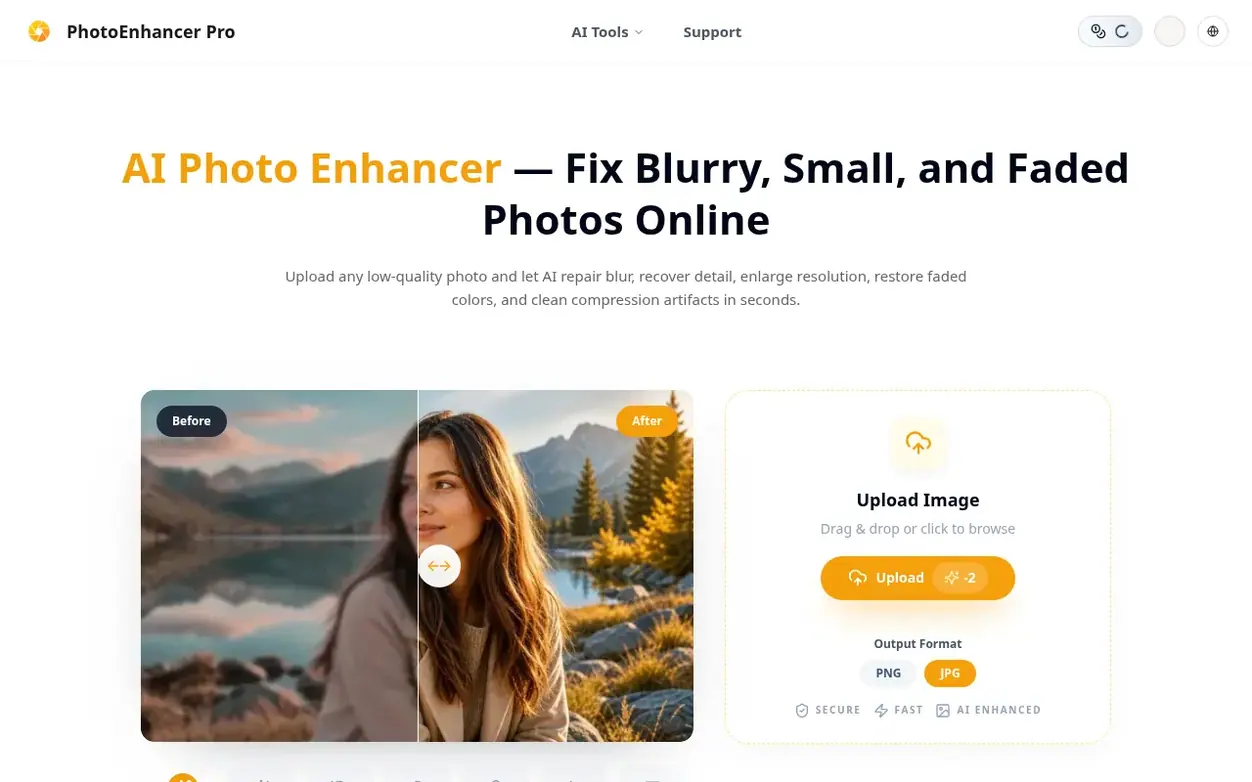
PhotoEnhancer Pro is a browser-based AI photo enhancement tool that helps users repair and improve image quality. It offers multiple scene modes including General for everyday clarity, Creative for richer interpretation, and specialized modes for portraits, products, scenery, and text. The tool automatically analyzes photos to enhance sharpness, contrast, color saturation, and can upscale resolution up to 4K, remove backgrounds, restore old photos, add color to black and white images, and remove scratches and blemishes. All processing happens in secure temporary containers with a zero-retention policy, meaning images are permanently deleted immediately after download and not used to train AI models. The platform supports common image formats including JPG, PNG, and WebP, requires no credit card to try, and delivers watermark-free results ready for professional use, e-commerce, or printing.
Systems
- AI Image Enhancer - automatically improve photo quality, sharpness, contrast, and color saturation
- Photo Upscaler - increase image resolution up to 4K while maintaining detail clarity
- Background Remover - intelligently identify subjects and precisely remove backgrounds for product images and portraits
- Photo Restoration - repair scratches, fading, and damage in old photos
- AI Photo Colorizer - add realistic colors to black and white photos
- Scratch Removal - precisely remove scratches, spots, and other blemishes from photo surfaces
- Multiple scene modes - General, Creative, Portrait, Object, Scenery, and Text
- Before and After comparison view - clearly showing improvement effects
- Multiple format support - JPG, PNG, WebP conversion and export
- Zero-Retention privacy policy - images permanently deleted immediately after download
Pricing
Pricing model: Free
Quick answers
- How do the General and Creative scenes differ?
- General keeps the enhanced image close to the original for everyday clarity. Creative gives the AI more room to interpret the subject, so it works better for stylized posts, products, scenery, and richer visual detail.
- Is it safe to upload private or sensitive photos?
- Yes. PhotoEnhancer Pro operates on a strictly Zero-Retention policy. Images are processed in isolated temporary containers and are permanently deleted from servers immediately after download. Photos are not kept to train AI models.
- Does the photo enhancer add watermarks to images?
- No. Enhanced photos can be downloaded watermark-free and are ready for immediate use in professional presentations, e-commerce listings, or printing.
- Can I use enhanced photos for commercial purposes?
- Yes. As long as you own the copyright to the original image, you retain full rights to the enhanced version. You are free to use them for e-commerce, advertising, or client projects.
- Can the Text scene fix damaged old photos?
- Yes. For faded letters or restoration details, select Text. The prompt focuses on readable edges, paper texture, and believable recovery instead of only sharpening pixels.
PhotoEnhancer Pro has a free listing. The owner can unlock the full profile with a paid launch for $5:
- Founder story (locked)
- Milestones (locked)
- Demo video (locked)
- Dofollow website link (locked)
Also on the frontier
-

Rank 1: Nano Banana Pro
AI-powered platform for creating and editing high-quality images with perfect text rendering and studio controls
DR 19 no change since last check 0 votes. Log in to send Nano Banana Pro a vote -
Rank 2: AI Remover
Video text remover tool that uses AI to automatically detect and remove text, subtitles, watermarks, and captions from videos while reconstructing the background naturally
DR 16 no change since last check 0 votes. Log in to send AI Remover a vote -

Rank 3: SubHero
AI-powered transcription and subtitle translation for 100+ languages
AI Media GenerationHong Kong
DR 3 no change since last check 0 votes. Log in to send SubHero a vote -
Rank 4: TranslateImage AI
AI-powered image translation that preserves original font, layout and style
DR 7 no change since last check 0 votes. Log in to send TranslateImage AI a vote